
Are you receiving unwanted PlayStation 3 direct messages? If so, this notice will help you learn what to do.
Quick Steps to Stay Safe Online on PlayStation 3
- If you receive an unwanted PlayStation 3 message, do not respond.
- Block the user if possible. You may need to block them from the PlayStation mobile app if your PS3 block list is full.
- Press triangle on the message and scroll down to find Grief report if available.
- A disclaimer will be shown to you. Press Ok to send the report.
- Do not discuss the contents of the unwanted message publicly, as it may contain sensitive or harmful information.
PlayStation 3 direct messages are Sony’s responsibility, not LBP Union’s.
The Problem
Anyone can message you on PlayStation 3. Therefore, anyone can send you an unwanted messages provided that they aren’t blocked. They could also create additional accounts to circumvent blocks.
What We’re Doing
LBP Union has disabled the ability to see the list of currently active users on Beacon custom LittleBigPlanet servers. This was made possible in a new merged Project Lighthouse pull request by kokofloral. We believe that this feature was being abused to target online players to send them malicious messages. This change will better protect the privacy of online players.
We are unable to take action on this matter directly because PlayStation 3 direct messages are controlled by Sony. Only they can take action on this problem.
Can PlayStation 3 Messages Be Reported?
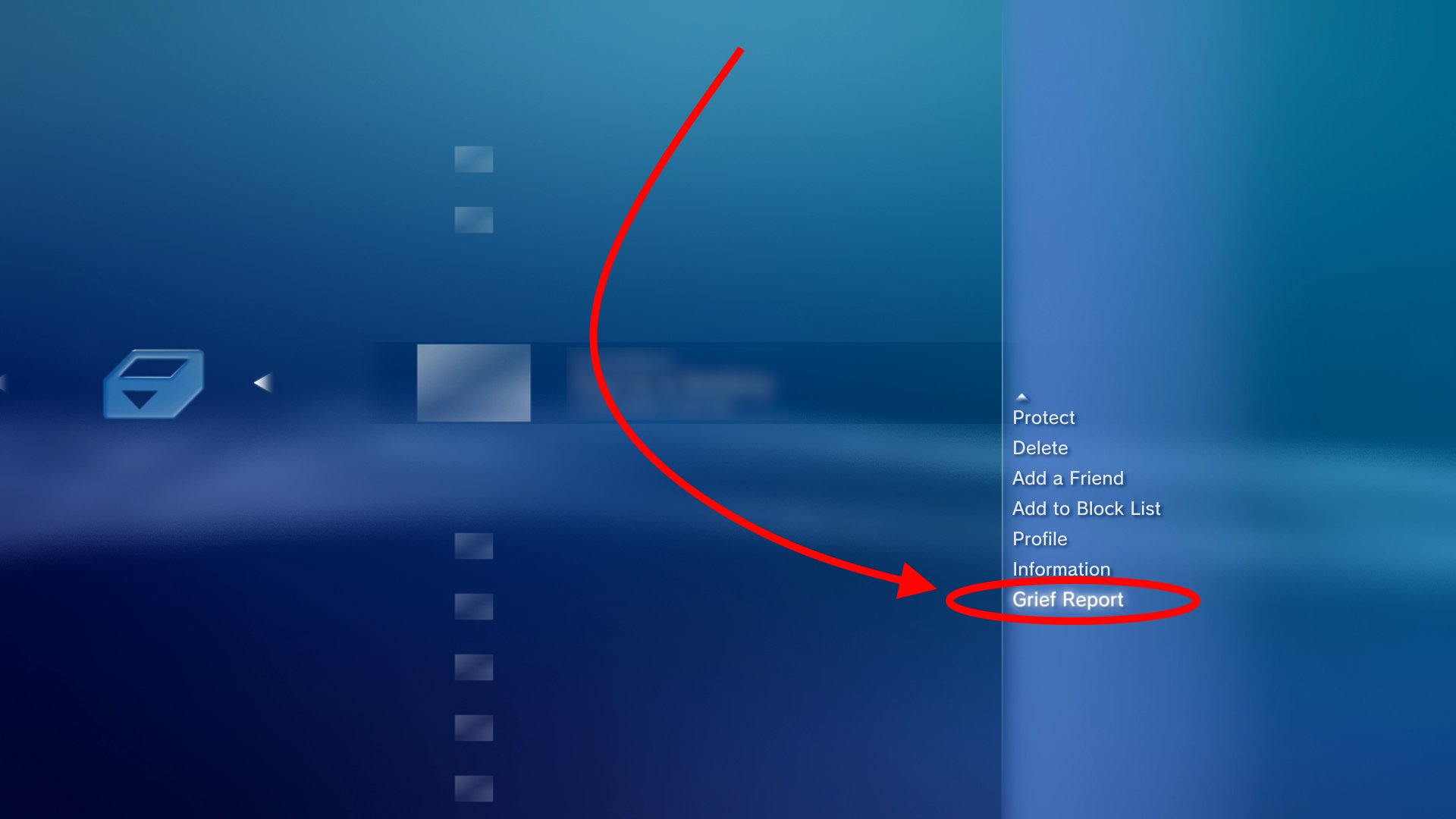
Yes. PlayStation 3 messages can be reported. Follow these steps:
- Find the unwanted message in your inbox.
- Press Triangle to open options.
- Scroll down to find Grief report. This won’t be visible by default, as it’s too far down in the list.
- Upon clicking the button, you’ll see a disclaimer. Click Ok to submit the report.
Some users report that the Grief report option isn’t available at all. If you have this problem, please let us know in the comments below to help us understand the scope of the issue.
![The PlayStation 3 grief report disclaimer. You will compose a grief report against this message to Sony Interactive Entertainment. Carefully read the following information, and then select [OK].
You may report a user who is acting inappropriately in breach of the Sony Entertainment Network Terms of Service and User Agreement to Sony Interactive Entertainment ("SIE"). If a user is not violating the Community Code of Conduct as set forth in the Terms of Service and User Agreement, please do not register a complaint. If you make a false report, this may result in termination or suspension of your Sony Entertainment Network account. SIE does not disclose to individual users the status or results of individual complaints.](https://www.lbpunion.com/wp-content/uploads/2026/05/Screenshot-2026-05-07-09-55-01.png)
What Should You Do?
If you receive an unwanted PlayStation 3 direct message:
- Report it.
- Block the user who sent the message.
Do Not Discuss Contents of Unwanted Messages Publicly
Unwanted messages may contain harmful information. This can damage other user’s privacy or cause them distress. You also risk drawing undeserved attention to the perpetrators of the message by sharing the username of the sender publicly.
LBP Union Will Never Send You PlayStation Messages
PlayStation direct messages are not an official channel of communication of LBP Union. If you receive a message via PlayStation direct messages which claims to be from LBP Union, this is someone impersonating LBP Union. Examples of official LBP Union support and communication channels are:
- Emails from the @lbpunion.com domain
- Moderation messages from LBP Union’s Discord server via the bot Unbelievaboat
- Discord tickets with LBP Union staff members in our Discord server
- In-game notifications from Beacon
Need Help?
If you need to report inappropriate content on Beacon, please use the Select button on your controller to create a Good Grief report. Our moderation team will review the details. Alternatively, please contact LBP Union moderation via email.
Thank you! Please share this with your friends so that they can be better informed about how to stay safe when playing online on PlayStation 3! Join the discussion on our forum.